

Nelnet Payment Plan (CUNYfirst only)
1. What is a payment plan?
The payment plan is an easy, convenient and low-cost option to budget tuition & fees. It is not a loan program! There is no interest assessed, and a credit check is not required. There is a one-time enrollment fee of ($30.00) and it is charged each semester the payment plan is utilized.
2. Where can I enroll in a payment plan?
Enrollment in the payment plan is completed through your CUNYfirst account only.
Navigation Instructions:
First, be sure to disable the pop-up blockers in your web browser. This is to ensure that all links will load to the next page.
- In CUNYfirst, go to "Student Center," "Financial Account," "Payment Plan." The QuikPay page/portal will load in a new tab or window.
- In the QuikPay portal, select "Payment Plan" again from the left-hand menu.
- Click on the current term payment plan option.
- Create a Budget Worksheet: You must manually enter your semester bill amount in the T&F box. If your financial aid awards are authorized on your tuition bill, you can include these figures in the appropriate boxes. *Important Notice: Entering inaccurate figures in the Budget Worksheet will cause the down payment to be inconsistent with remaining payments! (See Appendix A for guidance on completing the Budget Worksheet.)
- Finalize Plan: Enter/save payment information and review scheduled payments. Enrollment is completed after agreeing to Nelnet’s Terms & Conditions (you must check the box).
3. When can I enroll in the payment plan?
Students should enroll in a payment plan before the term posted due dates. This is to avoid Late Fees, course cancellation/deregistration and Bursar holds. In addition, the student can maximize on the number of installments the earlier they enroll for the plan. These installment deadlines are preset by the City University of New York and cannot be modified/extended.
Fall 2026 Payment Plan
| Plan Type | Enrollment Period | Remaining Installments |
|---|---|---|
| 6-Installment | 4/8/2026 - 6/22/2026 | JUL-AUG-SEP-OCT-NOV |
| 5-Installment | 6/23/2026 - 7/22/2026 | AUG-SEP-OCT-NOV |
| 4-Installment | 7/23/2026 - 8/24/2026 | SEP-OCT-NOV |
| 3-Installment | 8/25/2026 - 9/4/2026 | OCT-NOV |
*Your down payment is considered your 1st installment and is due upon enrollment + the Enrollment Fee.
Summer 2026 Payment Plan * C L O S E D *
(Enrollment period: 4/8/2026 - 7/22/2026)
4. How is the payment plan recorded?
Payment plan installments are posted to the student’s account based on their chosen payment method. Because QuikPay–Nelnet is an automatic payment service, you do not need to manually submit a payment each month. Please ensure that your preferred payment method has available funds at the time of your scheduled installment date(s).
- Returned/failed transactions: Payments that fail are subject to a Returned Payment Fee of ($30)/per occurrence. Refer to your payment plan contract for more information: Student Center > Financial Account > Payment Plan > (QuikPay page will load in a new window/tab) select 'Payment Plan' again from menu > click on your agreement ID number (hyperlink) to view your plan details/scheduled dates/or to update your payment method.
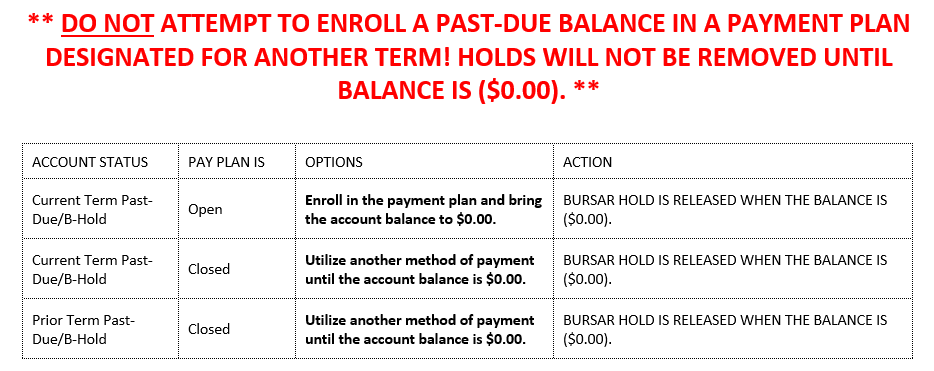
5. I have a past-due balance/Bursar hold. Can I use the payment plan to clear it?
Should a balance become past-due and a Bursar hold is placed on your record, enrolling in the payment plan does not guarantee hold clearance! Equally important, the University payment plan (serviced by QuikPay–Nelnet) has target enrollment dates. This means plans have specified open and close times. Once the current term payment plan has closed, the student is no longer able to use the service.
6. How do I cancel my payment plan?
Students will need to call Nelnet's Customer Service (888)-470-6014 to formally terminate their payment plan contract if it is no longer needed (have your emplid ID number ready to provide). Please note that once your plan is cancelled, you will not have the option to use it for the remainder of the semester (you can still use it for future semesters). If you are eligible for a refund, it will be issued by the CUNYfirst system.
7. Who can I contact if I have additional questions?
Nelnet's Customer Service: (888)-470-6014 or visit John Jay College CUNY—My College Payment Plan.