

Create a New Unit in the New Content Experience
Create a New Unit
In Brightspace NCE, a Unit is the top-level organizational structure for course content. It is used to group related learning materials into major sections of a course. A Unit is the equivalent of a Module in the Classic Content view.
- On your Course Navbar, select Content.
Select New Unit in the upper left.
Image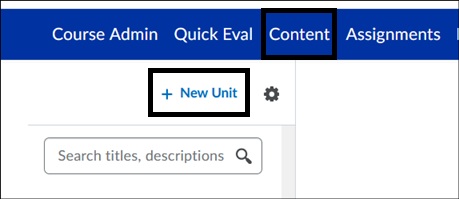
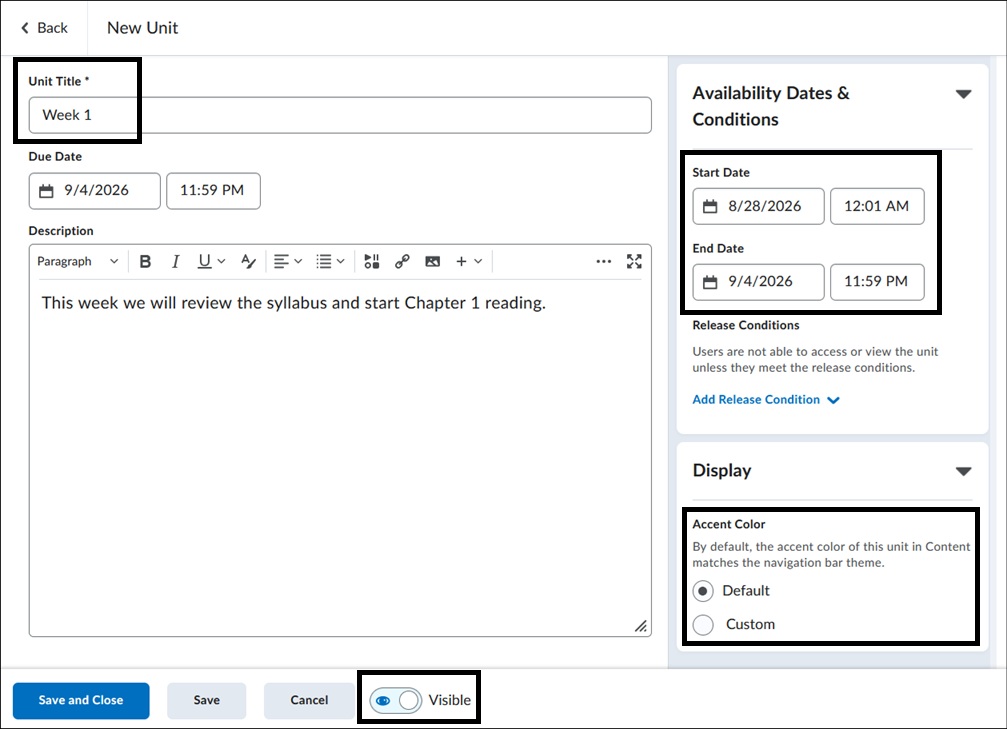
- On the New Unit page, enter the following:
- Enter a Name for the Unit.
- Select Add a Due Date and enter a due date if needed.
- Enter a Description for the unit.
- Select Availability Dates to set a Start and End Date for the new unit. Using Start/End Dates will restrict access to materials before and after the dates set. It is not required to use a Start/End Date.
- Under Display, select Default or Custom if you want to set a specific color for the unit heading.
- Use the Visibility toggle to make a unit visible or hidden to learners. Note that this setting overrides the Start/End Dates of the unit.
- Select Save.
Image
View Create a New Unit for more information.
For more information and assistance, please email the Office of Digital Learning - Learning Management System Support at LMS.faculty@jjay.cuny.edu