
Brightspace Email and Notifications Delivery
View instructions as a PDF: Brightspace Email and Notifications Delivery
Email Delivery
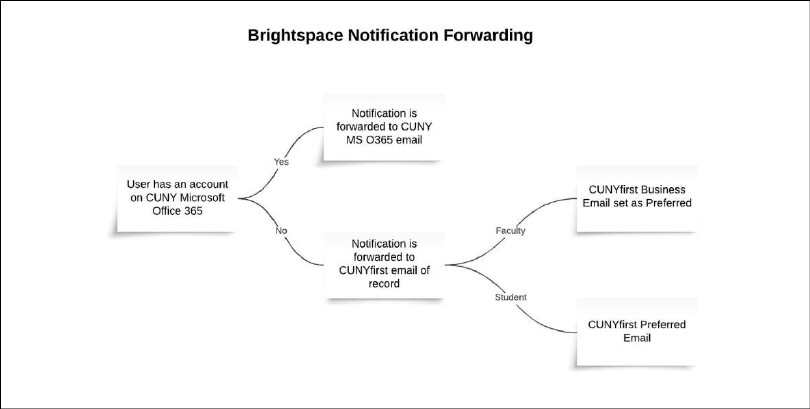
It is important for all users to be aware of how their notifications from Brightspace will be delivered. All users are displayed in Brightspace with their CUNY Login account listed in place of their email address. Users cannot change this listing in Brightspace to a campus email account.
• For users who are only affiliated with John Jay (no prior or concurrent CUNY affiliations), notifications will be forwarded to their email address as listed in CUNYfirst:
o Faculty and staff: Business email address is listed and checked off as Preferred
o Students: Preferred email address
• Users who have prior or concurrent affiliations with campuses participating in the CUNY Microsoft Office 365 email system, all notifications from Brightspace will be sent to that email account. See the Troubleshooting section below for information on accessing the CUNY Microsoft Office 365 email system.
The diagram below demonstrates how Brightspace notifications are processed.
Troubleshooting
If you believe you aren’t receiving notifications from Brightspace, try the following:
• Access your John Jay email and make sure the Brightspace notification emails aren’t being directed to the Junk folder of your John Jay email. Access John Jay email at https://webmail.jjay.cuny.edu/owa
• Verify that your email address is listed correctly in CUNYfirst at https://home.cunyfirst.cuny.edu/
• Log into CUNY Microsoft Office 365 and check whether the Outlook app is shown, which indicates that you have an email account at another CUNY campus. CUNY Microsoft Office 365can be accessed at https://www.cuny.edu/about/administration/offices/cis/technology-services/microsoft-office-365-for-education/. If Outlook is listed, check to see if your mail is there.
Updates to CUNYfirst email addresses can be requested from the offices below. ODL LMS Support cannot update user information in CUNYfirst.
• Faculty and Staff: askhr@jjay.cuny.edu
• Students: sscaldafferry@jjay.cuny.edu
Assistance with John Jay email is available from the Department of Information Technology Help Desk at 212.237.8200 and helpdesk@jjay.cuny.edu.
Email forwarding
It is possible to forward your email to another account and some users may wish to forward their CUNY Microsoft Office 365 email. However, auto-forwarding of email is subject to the CUNY Email Auto-Forwarding Policy and raises security, privacy, and technical issues, in addition to potential legal and public institution governance implications. It is important to rmember that CUNY support staff will be unable to diagnose or resolve delivery problems with a non-CUNY email provider.
If you must forward your email, we strongly recommend it only be forwarded to another CUNY email account in keeping with the CUNY Email Auto-Forwarding Policy, which specifically states “Email sent to a CUNY email address mailbox shall not be forwarded through an automated means to a non-CUNY destination email address.”
For the full CUNY Email Auto-forwarding Policy, visit:
https://www.cuny.edu/wp-content/uploads/sites/4/page-assets/about/administration/offices/cis/information-security/security-policies-procedures/Auto-Forwarding-Procedure-Final-151130.pdf
For information and assistance with Brightspace, please email ODL Learning Management System Support at LMS.faculty@jjay.cuny.edu (faculty) or LMS.student@jjay.cuny.edu (students).