

Faculty Resources

Creating Accessible Content
The website below provides guidance for making Microsoft Office documents (Word, PowerPoint) and PDFs accessible, particularly for users of assistive technologies like screen readers. It emphasizes:
- Whenever possible, author content in accessible Word format first, then convert to PDF.
- PDFs must be “tagged” (i.e. include hidden structural labels) and contain searchable text to be accessible.
- Use built-in features like headings, alt text for images, proper table markup, descriptive links, and avoid layout tricks like floating objects or using color alone to convey meaning.
- Use Microsoft Word’s Accessibility Checker to catch common accessibility issues.
- When converting to PDF, use tools (e.g. Adobe Acrobat Pro) that support proper tagging rather than “printing to PDF.”
- For scanned documents, use OCR (optical character recognition) before remediating for accessibility.
- The document also offers advice on accessible PDF forms, PowerPoint practices, and links to additional resources and guides.

CUNY Guide for Teaching Students with Disabilities
CUNY has created a faculty guide to help faculty members better understand disability accommodations, inclusive teaching practices, and strategies for supporting student success in classrooms.
This faculty guide will go over the following:
- disability identity, culture, and inclusion;
- disability rights laws and CUNY policies;
- disability categories and accommodations;
- student, faculty, and staff rights and responsibilities in the accommodations process;
- inclusive emergency procedures;
- assistive technology and content accessibility;
- how universal design for learning benefits all students;
- CUNY disability programs and offices;
- a glossary of terms;
- and additional resources.
Faculty Handbook
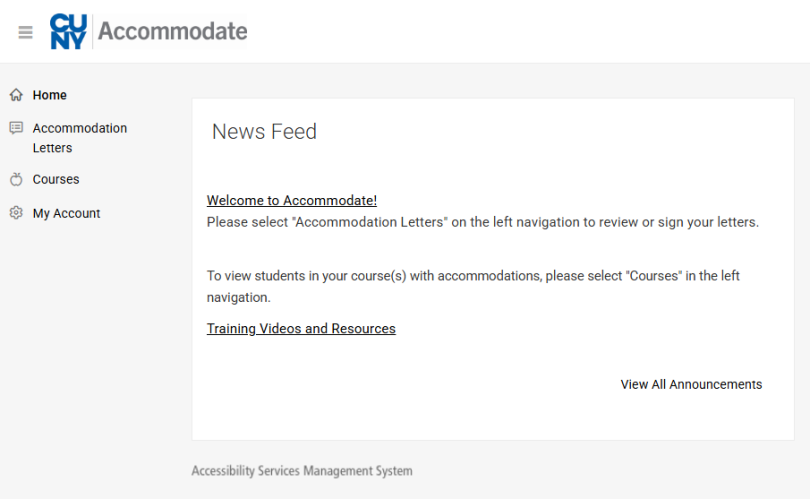
CUNY Accommodate is an accommodation management system that allows students to request accommodations, exams, and begin their application process with the Office of Accessibility Services. This platform is also used by Faculty for the following:
- View Accommodation Letters
- View Approved Exam Requests
- Upload Exams
- View Courses and Enrolled Students (Both Accommodate and Non-Accommodated)
As this is a new system recently introduced in January of 2025 by CUNY Central, the Office of Accessibility Services have created a handbook for Faculty to assist them with their navigation of the system.

Comprehensive Handbook for Faculty and Staff
The Office of Accessibility Services have created a comprehensive handbook for all Faculty and Staff to introduce them to our office and the services we provide. In this handbook, you will learn about:
- Services the Office of Accessibility Services offer
- Common Accommodations
- Assistive Technology provided to students
- Course Accessibility Requirements
- CUNY Accommodate
- How students register with the Office of Accessibility Services
- And more!
| Type of Concern | Contact Person | Email Address |
|---|---|---|
| General Inquiries | Office of Accessibility Services | accessibilityservices@jjay.cuny.edu |
| Accommodation Concerns | Elena Beharry, PsyD, Director | Ebeharry@jjay.cuny.edu |
| Title IX / Pregnancy | Jessica Greenfield, Title IX Coordinator | Jgreenfield@jjay.cuny.edu |
| Diversity & Compliance | Alisa Cupid, Chief Diversity Officer | CDO@jjay.cuny.edu |
| Teaching & Learning | John Jay TLC | Tlc@jjay.cuny.edu |
| CUNY Accommodate Issues | Central Office of Disability Programs | Disability@jjay.cuny.edu |
| Assistive Technology | Jonathan Zou, AT Coordinator | Jonathan.zou47@login.cuny.edu |
Accommodation Information
This checklist provides a quick reference for faculty to ensure compliance with accessibility requirements at John Jay College. It outlines key steps for supporting students with accommodations, including updates to the syllabus, exam procedures, the use of the CUNY-Accommodate portal, and communication with the Office of Accessibility Services (OAS). The guide reinforces the importance of timely submissions, confidentiality, and proper referral procedures.
This is just a quick checklist that you can use. To go more in depth, please read the full guidelines below and visit our OAS Policies page and the CUNY Policies page available on our main page.
Students with disabilities are entitled to confidentiality over disability-related status or details. Students are not required to disclose their specific disability to their instructors or anyone else. (Instructors are entitled to know when their students have registered with OAS and what accommodations they have been approved to receive.) Instructors and staff must take care not to seek the disability-related status or information from students or to disclose a student’s disability status to others in or outside the classroom.
All faculty must have an ADA statement on the first page of their syllabus that includes the location and contact information for OAS.
Suggested language:
“I am committed to creating a course that is inclusive in its design. Students who need an accommodation due to a disability are encouraged to contact the Office of Accessibility Services (OAS) within the first week of class or as soon as possible thereafter. Requests for Accommodations can only be approved by the OAS. Students with disabilities are entitled to confidentiality over disability-related status or details. Students are not required to disclose their specific disability to their instructors or anyone else. All OAS approved accommodations will be honored and implemented in my course.”
Contact OAS, New Building, room L.66
Phone: (212) 237-8031
Email: accessibilityservices@jjay.cuny.edu.
In accordance with federal law and existing CUNY policy, textbook and course materials information must be submitted to the online bookstore Akademos/Vitalsource at least two weeks prior to the date the schedule of classes is made available. Textbook information for Spring 2025 not previously entered, must be entered immediately. Courses which do not require a textbook, must also be identified as such. This information is necessary to ensure that course materials are accessible to students with disabilities by the first day of class to the greatest extent possible. Department chairs are responsible for ensuring textbook information is posted for all departmental courses. The Provost and department chairs have access to textbook compliance reports through CUNY’s Tableau site. If a department does not have access to the report, please complete the CUNY Tableau Server Access Request Form. Note: The Interim Dean of Faculty has direct administrative access to the bookstore site.
Course Material Upload: We strongly recommend that instructors upload their course materials in the University-supported LMS (Brightspace) for each class regardless of modality. A Brightspace course site has been created for every CUNY class scheduled for Spring 2025. Uploading course materials in the LMS will help instructors identify accessibility problems using Ally, a tool within both Blackboard and Brightspace, and work with technical experts to improve accessibility of course materials. Ally generates alternative formats that enable students to choose how to engage with the course’s digital content. Resources on how to use Ally effectively:
Prior Consideration of Materials: In accordance with the ADA, NYS IT Accessibility Policy, and other laws, instructors should consider the accessibility of course materials, online learning products, platforms, and applications, including content they created, prior to use in the course.
One of OAS’s departmental goals has been to streamline the accommodation request process and reduce the amount of follow-up required of students and faculty. We are pleased to share that CUNY has launched CUNY Accommodate across all campuses on January 2nd. This site can be accessed via the link below with your CUNYfirst credentials. CUNY Accommodate is an innovative platform designed to streamline the management of student accommodations, providing a more efficient way for Faculty to receive accommodation forms, fulfill student exam requests, and retrieve completed exams. With CUNY Accommodate, students with disabilities will have a streamlined process for requesting their accommodations, ensuring a smoother experience for everyone involved. This system integrates students, their accommodations, course schedules, Faculty, and the Office of Disability Services (ODS) into one cohesive platform, promoting an inclusive and supportive environment for all students. We encourage you to familiarize yourself with CUNY Accommodate by exploring our self-directed instructional videos and comprehensive guides that walk you through what you need to know to use the system (Access SharePoint then enter your CUNYfirst username and password to get started). You can access these resources and the CUNY Accommodate system:.
- CUNY Accommodate
- Faculty User Guide to CUNY Accommodate (Documentation)
- How to Set Up Exam on CUNY Accommodate (Video)
- How to View Accommodation Letters (Video)
Raising concerns around an accommodation
The objective of providing accommodations for students with disabilities is to ensure their equal participation and not to dilute or fundamentally alter academic or extracurricular requirements. If you believe an approved accommodation is not suited to a particular situation, or if you have any questions about delivering an approved accommodation, please contact Elena Beharry, PsyD at ebeharry@jjay.cuny.edu. Alternatives to approved accommodations must be assessed and approved in writing in advance by OAS. Please do not attempt to negotiate alternative accommodations with the student.
All testing accommodations for in-person exams must take place in the OAS Testing Center unless OAS approves a different arrangement in advance. Instructors should not provide a testing accommodation on their own in lieu of an approved testing accommodation.
Once OAS notifies the instructor that a student in the instructor’s class will take an upcoming exam in the OAS Testing Center, it is the instructor’s responsibility to ensure that OAS receives the exam to be administered at least 48 hours before the beginning of the exam. This can now be done through CUNY Accommodate by uploading your exam (see below) or you can contact the Office of Accessibility Services, at accessibilityservices@jjay.cuny.edu to arrange drop-off to OAS.
OAS will attempt to accommodate instructors’ preferences for when an exam in the OAS Testing Center should be administered; however, the precise timing of the exam will also depend on the student’s schedule and the operating hours of the OAS Testing Center. This means that some exams, as determined by OAS, may occur before, during, or after the time when other students in the class take a particular exam. OAS will notify instructors when their students’ exams have been scheduled to take place in the OAS Testing Center. Instructors who have concerns about asynchronous administration of exams should contact the OAS or the Academic Integrity Unit for strategies on how to maintain or foster academic integrity while upholding the requirement to accommodate students with disabilities.
Please Note For online exams located on Brightspace, faculty members will need to go to their "Classlist" for the course the student is enrolled in on Brightspace. Click on the arrow beside the student's name, select "Edit Accommodations", and modify the time limit so that is says "2 times" or "1.5 times", according to the student's accommodation, under "Multiplier of original quiz time". This will automatically apply to all quizzes/exams given to the student for that course on Brightspace.
General FAQ
Students must self-disclose their disability and apply through OAS. The process includes: obtaining supporting documentation, completing and submitting the application, meeting with an OAS disability specialist, and submitting a semester request each semester.
Students are encouraged to notify instructors as soon as they receive their accommodation letter. Faculty should state their preferred timeline in the syllabus.
*Students can apply for accommodations at any time during the semester.
No. Disability information and documentation are confidential. The accommodation letter specifies what is approved.
Yes. Failing to do so violates federal law (ADA and Section 504). Contact Elena Beharry, PsyD, Director of Accessibility Services, at ebeharry@jjay.cuny.edu before raising concerns with the student.
Yes. Students with disabilities are held to the same academic standards as all students. Accommodations provide equitable access to learning and assessment opportunities but they do not guarantee a passing grade or academic success.
No. You must maintain strict confidentiality at all times.
No. FERPA/HIPPA protects student confidentiality. Please direct all inquires regarding accommodations to the Office of Accessibility Services.
Direct the student to Office of Accessibility Services to discuss their needs. You are not required to provide any accommodations without an official letter.
No. Accommodations ensure equal educational opportunity they level the playing field so students can demonstrate their knowledge and abilities.
Yes. PDFs should be tagged and contain searchable text. Author in Word first, use heading styles, add alt text to images, and convert using Adobe Acrobat Pro.